
Misleading Domain Renewal Invoices: Why Every Business Needs a Digital Supplier Register
This week, a client contacted Seven Hills Creative after receiving an invoice asking for roughly £75 to renew a domain. We already manage that domain on the client’s behalf, and in that specific case the renewal cost is around £10 per year. The invoice had come from a company completely unrelated to the domain arrangement, so the client checked with us before paying.
That one small check probably saved them money, confusion and a much bigger admin problem. Nothing happened because the client knew who managed the domain. Many businesses do not. To an accounts team or office manager, a domain renewal invoice can look like routine paperwork.
This is why misleading domain renewal invoices keep working. They arrive at the right time, reference a domain and sit in the grey area between admin, IT and cybersecurity. The aim of this article is simple: explain what these notices are, why businesses get caught out, how to check who manages your domain, and why a digital register matters.
What happened
In this case, the client did exactly the right thing. They forwarded the invoice and asked whether it was genuine. That matters because the invoice looked plausible on the surface: it mentioned a real domain, gave a payment amount, and created the impression that something important needed renewing.
The key point is that the invoice did not come from the company that currently manages the domain. It was an invoice from an unrelated company. The practical lesson is simple: never assume that a domain renewal invoice is valid just because it mentions your business name or website.
It is also worth being measured about pricing. A high renewal fee is not automatically proof of wrongdoing. Some providers add support, management or transfer services on top of the registry fee, and some domain extensions cost far more than others. The real issue is whether the sender is your current provider, whether the notice would transfer the registration, and whether the person approving payment understands the arrangement.
Why misleading domain renewal invoices exist
Domains are easier to target than many business owners realise. A company does not need privileged access to know that your domain exists. Registry and lookup tools can often reveal useful information such as the registrar, nameservers, status or other registration data, depending on the extension and the rules that apply. That makes domains an attractive target for unsolicited renewal offers and domain renewal phishing campaigns.
Some businesses send genuine commercial offers designed to move your domain to a different provider. In other words, the notice may not be your normal renewal at all. It may be an invitation to transfer the registration to a new supplier, often at a much higher price than you currently pay. The problem is that these offers are sometimes presented in a format that looks close to a routine invoice.
Other messages are more clearly misleading. They rely on admin pressure, vague wording or urgency to make payment feel safer than checking. Then there is domain renewal phishing, where an email imitates a registrar, hosting company or Microsoft 365 notification and tries to push the recipient into clicking a link, entering credentials or paying through a fake portal.
A transfer offer is not the same as phishing
This distinction matters. A domain renewal solicitation may be a real offer to transfer your domain to a different domain registrar. It might be unwanted, confusing or poor value, but it is not necessarily the same thing as a fake payment page or credential theft attempt.
A phishing email is different. Its purpose is normally to steal logins, payment details or money by pretending to be a trusted provider. In practice, though, your response should be identical in both cases: pause, verify who currently manages the domain, confirm the renewal cost and ask your supplier before you do anything.
Why businesses get caught out
Most businesses do not get caught because they are careless. They get caught because responsibility is fragmented. The person who pays invoices is often not the person who set up the domain. The person who approved the website years ago may have left. The current marketing manager may understand the website, but not the domain registrar, DNS or renewal process.
This is especially common in SMEs that have grown over time. A website supplier changes, hosting moves, someone buys Microsoft 365 through one reseller and email filtering through another, and nobody creates one clear view of who manages what. That is when a fake domain renewal invoice lands in the inbox of someone with enough authority to pay it.
It happens easier than you may think, these are some of the issues our clients have run into before and caused issues for the business with no understanding of who should be be responsible for an account::
- The person paying invoices does not know who manages the domain.
- The original website company has changed or no longer exists.
- A former employee registered the domain using their own email address.
- There has been staff turnover in finance, operations or marketing.
- Documentation is poor, outdated or spread across old inboxes.
- Different suppliers have been added over time with no single owner.
This is also why the question ‘who owns my domain?’ is often harder to answer than it should be. The website company, the hosting company and the domain registrar may all be different. One supplier may manage the site, another may manage email, and a third may hold the billing account. If that structure is not documented, mistakes become almost inevitable.
Why every business needs an IT supplier register
The best fix is not complicated. You do not need an enterprise asset management platform or a big IT department. For most SMEs, a well-maintained spreadsheet or simple internal document is enough. The goal is to create one trusted record of the services your business depends on, who provides them and what should happen at renewal time.
Think of it as a digital supplier register rather than a technical inventory. The format should be simple enough that a director, office manager or finance lead can use it without translation. If an unexpected invoice arrives, the first step should be to check the register, not search old emails and guess.
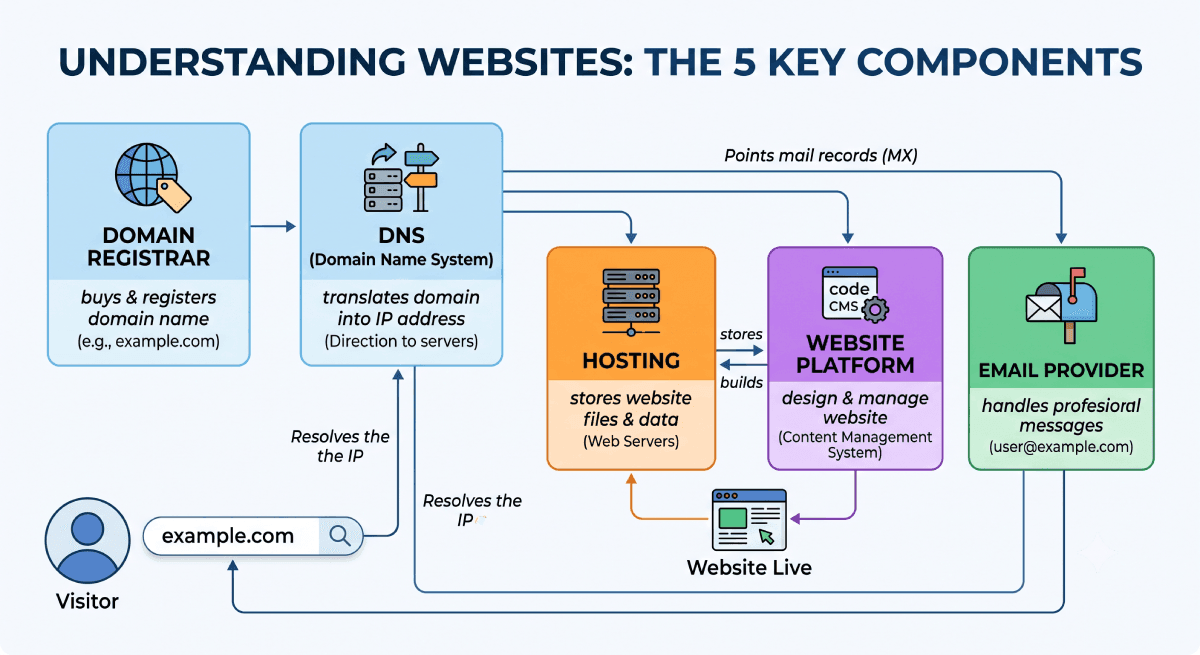
At minimum, most SMEs should keep a record of the following services and platforms:
- Domains
- Hosting
- Website
- SSL certificates
- Microsoft 365
- Google Workspace
- Email provider
- DNS
- Phone systems
- CRM
- Accounting software
- Marketing platforms
- Social media ownership
- Backup providers
- Password manager
For each item, record the basics that actually help a business make decisions and verify renewals quickly. The table below covers the core fields that matter most.
| Field | Why it matters |
| Supplier | The company or provider responsible for the service, so invoices can be matched properly. |
| Account owner | The person or mailbox with access to the billing and admin account. |
| Renewal date | The expected renewal timing, so unexpected notices stand out immediately. |
| Monthly or annual cost | A reference point for spotting inflated or duplicate charges. |
| Contact details | Support and escalation details for fast verification when something looks wrong. |
| Internal owner | The person inside your business who understands the service and can approve action. |
The field that is most often missing is the internal owner. That is the person inside the business who is responsible for the service, understands its role and can confirm whether a renewal notice makes sense. Without that internal owner, even good supplier information can still turn into delays and guesswork.
Other invoices that create the same risk
Domain renewals are only one example of a wider problem. Once a business outsources parts of its digital setup, almost any service can become vulnerable to confusing renewals, duplicated billing or messages from the wrong supplier.
A number of potential threats include:
- Microsoft 365 renewals: a business may buy through a reseller, but staff assume Microsoft invoices them directly.
- SSL renewals: some certificates are included with hosting, while other invoices make it sound as though the website will stop working immediately unless payment is made.
- Hosting invoices: a site may have moved years ago, but an old provider still sends notices to a generic accounts inbox.
- Google listings: some businesses are invoiced for services that sound official even though they are not from Google.
- Email services: spam filtering, archiving, backups or mailbox security can all sit with different suppliers under different billing arrangements.
The pattern is consistent. The biggest weakness is not usually a technical vulnerability. It is a visibility problem. If your business cannot easily see who manages a service, what it costs and when it renews, it becomes much easier to approve the wrong invoice or miss the right one.
A practical checklist before you pay any digital related invoice
If an invoice relates to a domain, website, hosting or cloud service and you were not expecting it, use this checklist before you approve anything:
- Never pay a digital related invoice you were not expecting.
- Check who currently manages the service.
- Verify the normal renewal cost and billing cycle.
- Confirm the sender, domain name and contact details.
- Ask your IT provider or website supplier if you are unsure.
- Keep an up-to-date digital supplier register in a shared secure location.
- Review the register at least once a year and after every supplier or staff change.
If you want to make that process even safer, add a simple rule to your finance process: no unexpected technology invoice gets paid without sign-off from the internal owner listed in the register. That small control prevents a surprising amount of wasted spend and avoidable disruption.
FAQ
What is a domain renewal invoice?
A domain renewal invoice is a request for payment linked to the renewal of a domain name. It may come from your real supplier, from a company inviting you to transfer the domain, or from a message that is misleading or potentially fraudulent. Check it against your current registrar and supplier records.
How can I tell if a domain renewal invoice is fake or misleading?
Start by checking whether you recognise the sender and whether they currently manage the domain. Compare the price, renewal date, domain extension and contact details against your own records. Be cautious of urgency, generic wording, unexpected bank details, or language that hides a transfer to another provider in the small print.
How do I check who owns my domain?
Use the relevant domain lookup tool for your extension. For .uk domains, Nominet’s lookup service can help identify the registrar. For many other extensions, ICANN lookup tools can point you toward the current domain registrar. You should also check your own billing records and supplier register, because account control is not always obvious from public data alone.
What does a domain registrar do?
A domain registrar is the provider authorised to register and renew domain names on behalf of the registrant. In practical terms, it is the company that manages the registration relationship, handles renewal and often controls account-level settings linked to the domain. Your website company may also be your registrar, but not always.
Can another company legitimately offer to renew or transfer my domain?
Yes. Some companies send genuine offers inviting you to move the domain to them. The problem is that those offers can look similar to routine renewal notices. A legitimate offer is still something that should be evaluated, not paid automatically, because moving the domain may change cost, control and support arrangements.
What should I do if I already paid a fake domain renewal invoice or suspicious notice?
Act quickly. Contact your bank or card provider, notify your current web, IT or domain provider, and check whether the payment triggered any transfer or account change. If you suspect fraud or cyber crime in England, Wales or Northern Ireland, report it through Report Fraud. If a suspicious email was involved, forward it to the NCSC as well.
What should be included in a digital register?
For each service, record the supplier, account owner, renewal date, monthly or annual cost, contact details and an internal owner. In most SMEs, it should also be obvious where the credentials are stored, who can approve billing changes and what would happen if the service stopped working tomorrow.
Be Aware
Sometimes the biggest business risks are not technical. They are administrative. A domain can be perfectly secure at the platform level and still be put at risk if the wrong person pays the wrong invoice, ignores the real renewal, or cannot work out who controls the account.
Good documentation is not glamorous, but it is powerful. A clear supplier register can save money, prevent service disruption, improve handover between staff and reduce cyber risk. For most SMEs, that is one of the simplest high-value improvements they can make.
If you’re unsure who manages your domains, website, hosting or business systems, Seven Hills Creative can help you audit everything, document it clearly and ensure you stay in control. Get in touch with our team today.